Support
How to reach the people who run PickBound, and where to find the things players most often ask about: signing in, deleting an account, and reporting a player.
01Contact Us
Email support@pickbound.app. This is the one address for every question about PickBound — your account, a duel, a bug, a privacy request, or a concern about another player.
Please write from the email address on your account, and include your username. If you are writing about a specific duel, tell us who it was against and roughly when — that is usually enough for us to find it.
PickBound is operated by StoryBound Tech LLC.
02Signing In and Your Account
You can sign in with an email address and password, with Sign in with Apple, or with Google.
If you cannot get into your account, email us from the address the account was created with and we will help from there. The rules for accounts are in the Terms of Use.
03Deleting Your Account
In the iOS app: open the Profile tab, then Settings, then Delete account. You will be asked to confirm who you are — with your password, with Apple, or with Google — and the account is deleted as soon as you do.
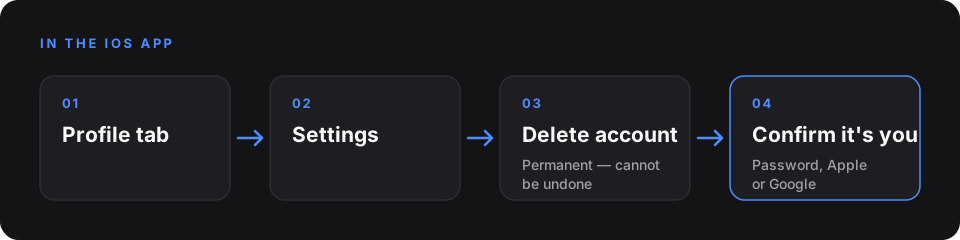
Anywhere else: email support@pickbound.app from the address on your account and ask us to delete it.
Deletion is permanent and cannot be undone. Duels you have already played stay in your opponents' history, shown under an anonymized placeholder rather than your name.
Exactly what is removed, what is kept, and why is set out in the Privacy Policy under Retention and Deletion.
04Reporting or Blocking a Player
You can block a player from their profile, which stops duels and requests between the two of you, and you can report a player to us from the same place. Blocking someone never prevents you from reporting them. In the iOS app, the players you have blocked are listed under Profile → Settings → Blocked players, which is also where you can unblock them.
If something needs more explanation than a report allows, email support@pickbound.app. How reports are handled is described in the Terms of Use.
05Coins, Chips, and Cosmetic Items
PickBound is free to play — every duel, every chip, and every level of a season is open without paying. The one purchase is the optional season pass, below. Chips, coins, and cosmetic items are virtual: they have no cash value, cannot be redeemed for money or anything of monetary value, and cannot be traded, gifted, or moved to another account. The full rules are in the Terms of Use.
If a balance, a reward, or the result of a duel looks wrong to you, email us with your username and the duel in question and we will look into it.
06The Season Pass
When it is offered, the season pass is an optional purchase in the iOS app that unlocks a second lane of cosmetic rewards on the season track. Its rewards are earned by playing and must be claimed before the season's claim window closes. It is sold through Apple's App Store only, and cannot be bought on the website. The full rules are in the Terms of Use.
Restoring a purchase. Once the iOS app offers the season pass, use Restore Purchases — on the Seasons tab, or under Profile → Settings — while signed in to the Apple ID that bought the pass. It re-applies the pass to the PickBound account you are signed in to, which is what to do on a new device or after reinstalling.
Refunds. Apple is the seller, so refunds are requested from Apple, at reportaproblem.apple.com, and Apple decides them — we cannot issue one. If a refund is granted, the pass and the rewards claimed under it are removed from your account.
If you deleted your account. The purchase stays with your Apple ID, not with the deleted account. Create a new account, then use Restore Purchases, and the pass is applied to it — as long as no other PickBound account holds it.
If the app says the pass is held by another account. One purchase can unlock the pass on one PickBound account at a time. Sign in to the account you bought it on, or email support@pickbound.app from the address on your account and tell us which account should have it.
07Privacy Requests
To ask for a copy of your information, to correct it, or to exercise any other privacy right, email support@pickbound.app from the address on your account. Your rights and how we respond to them are described in the Privacy Policy under Your Rights.